获取 SDK失败...................
-
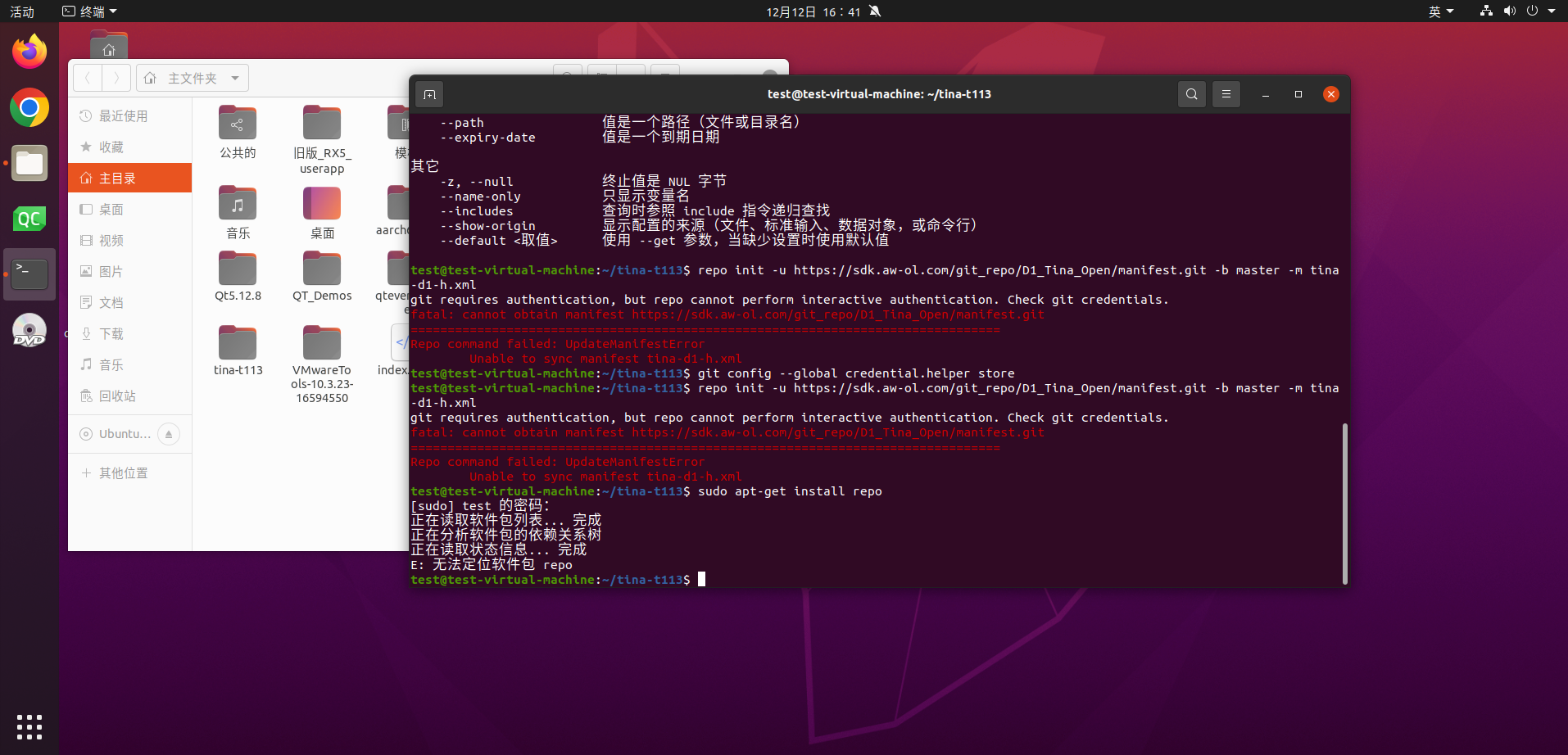
-
我也遇到了同样的问题,根据 Copilot 的说法,现在必须是 LV3 用户才能上传 SSH 密钥并通过 SSH 下载 SDK。我不确定这是不是真的,需要联系 LV3 团队来验证这个说法。
I'm using translation software. Original text in English:
I'm having the same problem, and according to Copilot one now has to be a LV3 user to be able to upload a SSH key and download the SDK's using SSH. Not sure if this is true, and need to reach LV3 to validate the claim. -
我不确定这是否是因为我现在处于 3 级状态,因为我之前没有尝试过 ssh 连接,但我现在能够下载存储库了。
我没在这个网站上找到输入 SSH 加密密钥的新设置,但我之前在 https://open.allwinnertech.com 网站上输入过。我当时用的也是同一个用户名。Copilot 显示系统没有使用那个密钥,但我的密钥确实有效,而且我们都知道人工智能也会说谎

例如,要下载 D1-H 代码库,我使用了以下命令:
创建目录:md tina-d1-h-open
进入目录:cd tina-d1-h-open
设置邮箱:git config --global user.email "you@example.com"
设置用户名:git config --global user.name "your_username"
初始化仓库:repo init -u ssh://your_username@sdk.aw-ol.com/git_repo/D1_Tina_Open/manifest.git -b master -m tina-d1-h.xml
同步仓库:repo sync
使用您的网站登录名作为您的用户名。
Original English text:
Not sure if it is due to now being on level 3, because I did not try the ssh route before, but I'm now able to download the repositories.I did not see a new setting to enter my ssh encryption key on this site, but I have done this before on the https://open.allwinnertech.com website. I have used the same username there. According to Copilot the system is not using that key, but it does work for me, and we all know that AI can tell lies
To download for instance the D1-H repository, I used the commands below:
Create a directory: md tina-d1-h-open
Enter the directory: cd tina-d1-h-open
Set email: git config --global user.email "you@example.com"
Set username: git config --global user.name "your_username"
Init repo: repo init -u ssh://your_username@sdk.aw-ol.com/git_repo/D1_Tina_Open/manifest.git -b master -m tina-d1-h.xml
Sync repo: repo syncUse your website loginname for your_username.
-
遇到同样的问题,也是获取sdk失败
Copyright © 2024 深圳全志在线有限公司 粤ICP备2021084185号 粤公网安备44030502007680号