飞凌嵌入式T153开发板 - (3)基于CMake构建一个测试demo
-
1、安装cmake
forlinx@ubuntu:~/work/OKT153-linux-sdk$ sudo apt get install cmake #安装CMake
forlinx@ubuntu:~/work/OKT153-linux-sdk$ cmake --version #查看cmake 版本信息
 ![50da34c1-3a27-4a1a-8161-3e79982d5593-image.png]
2、创建测试例程demo.c
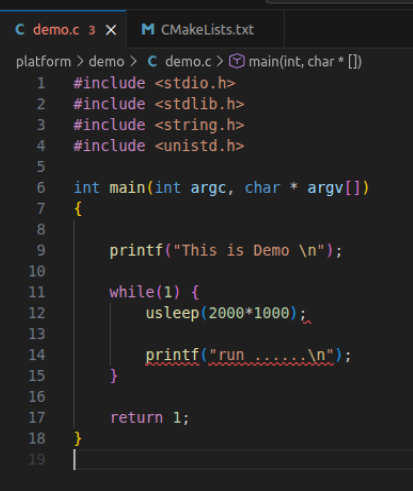
工程目录结构如下所示:
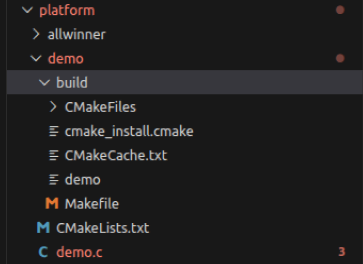
3、在工程中配置CMakeLists.txt 文件
forlinx@ubuntu:~/work/OKT153-linux-sdk/platform$ touch CMakeLists.txt #创建cmake文件
CMakeLists.txt 示例内容如下:cmake_minimum_required(VERSION 3.0.0)
set(name demo)
project(${name} )
#Add C compile
set(TOOL_CHAIN_PATH /home/forlinx/work/OKT153-linux-sdk/out/toolchain/gcc-linaro-11.3.1-2022.06-x86_64_arm-linux-gnueabihf/bin)
set(CMAKE_C_COMPILER ${TOOL_CHAIN_PATH}/arm-linux-gnueabihf-gcc)
set(CMAKE_CXX_COMPILER ${TOOL_CHAIN_PATH}/arm-linux-gnueabihf-g++)
#Add compile item.
add_compile_options(-fPIC -Wall -rdynamic -g -funwind-tables -fasynchronous-unwind-tables -D_FILE_OFFSET_BITS=64)
#Add source file.
set(src demo.c)
add_executable(${name} ${src} )3、使用cmake 命令生成makefile
forlinx@ubuntu:~/work/OKT153-linux-sdk/platform/build$ cmake ../ #生成Makefile文件4、执行make 命令生成可执行文件
forlinx@ubuntu:~/work/OKT153-linux-sdk/platform/build$ make #编译工程生成可执行文件

5、使用sftp 将demo 发送至开发板
forlinx@forlinx:~/work/OKT153-linux-sdk/platform/demo/build$ sftp forlinx@192.168.8.200
sftp> put ./demo /home/forlinx/

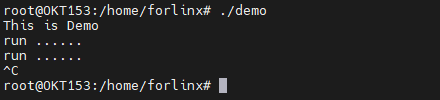
6、在开发板运行demo
root@OKT153:/# cd /home/forlinx/
root@OKT153:/home/forlinx# chmod +x demo
root@OKT153:/home/forlinx# ./demo
Copyright © 2024 深圳全志在线有限公司 粤ICP备2021084185号 粤公网安备44030502007680号