最近,收到飞凌嵌入式和全志在线的开发板试用活动板卡:OK153-S,我们做了一些简单的使用记录。
一、开箱照
下面是两张开箱照:
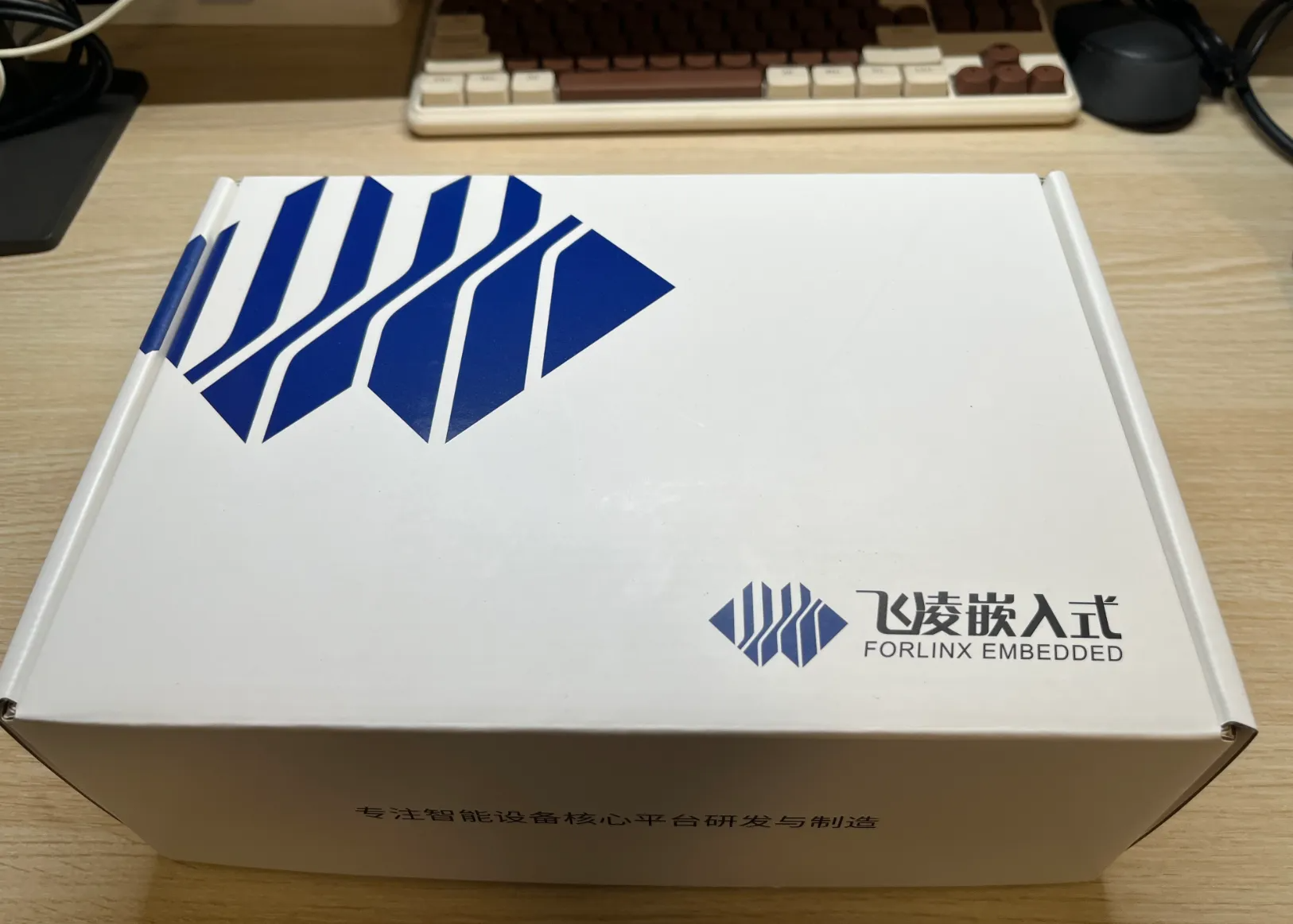

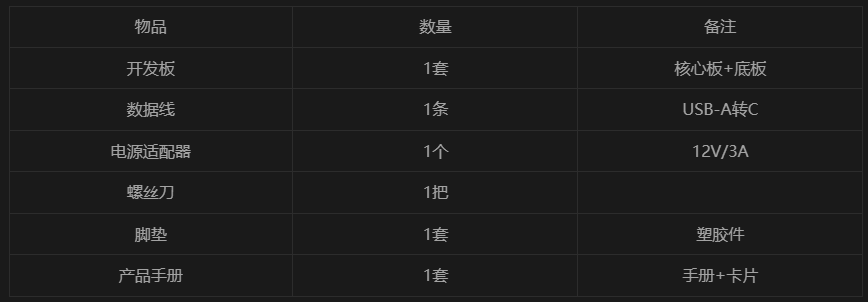
整体包装还是挺不错的,包含了如下物件:
二、开发板基本配置
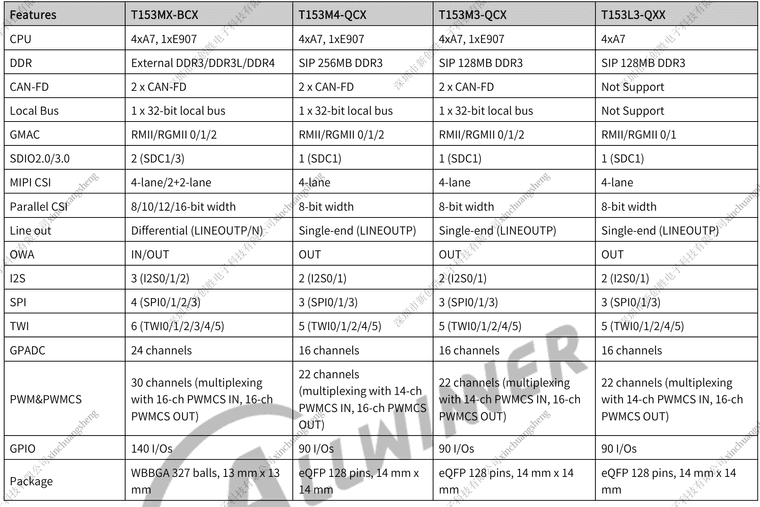
我们这次拿到的开发板OK153-S,使用的SOC是全志T153MX-BCX,搭配了512MB DDR3L和8GB eMMC配置。关于全志T153这款SOC,有如下几种配置对照表:
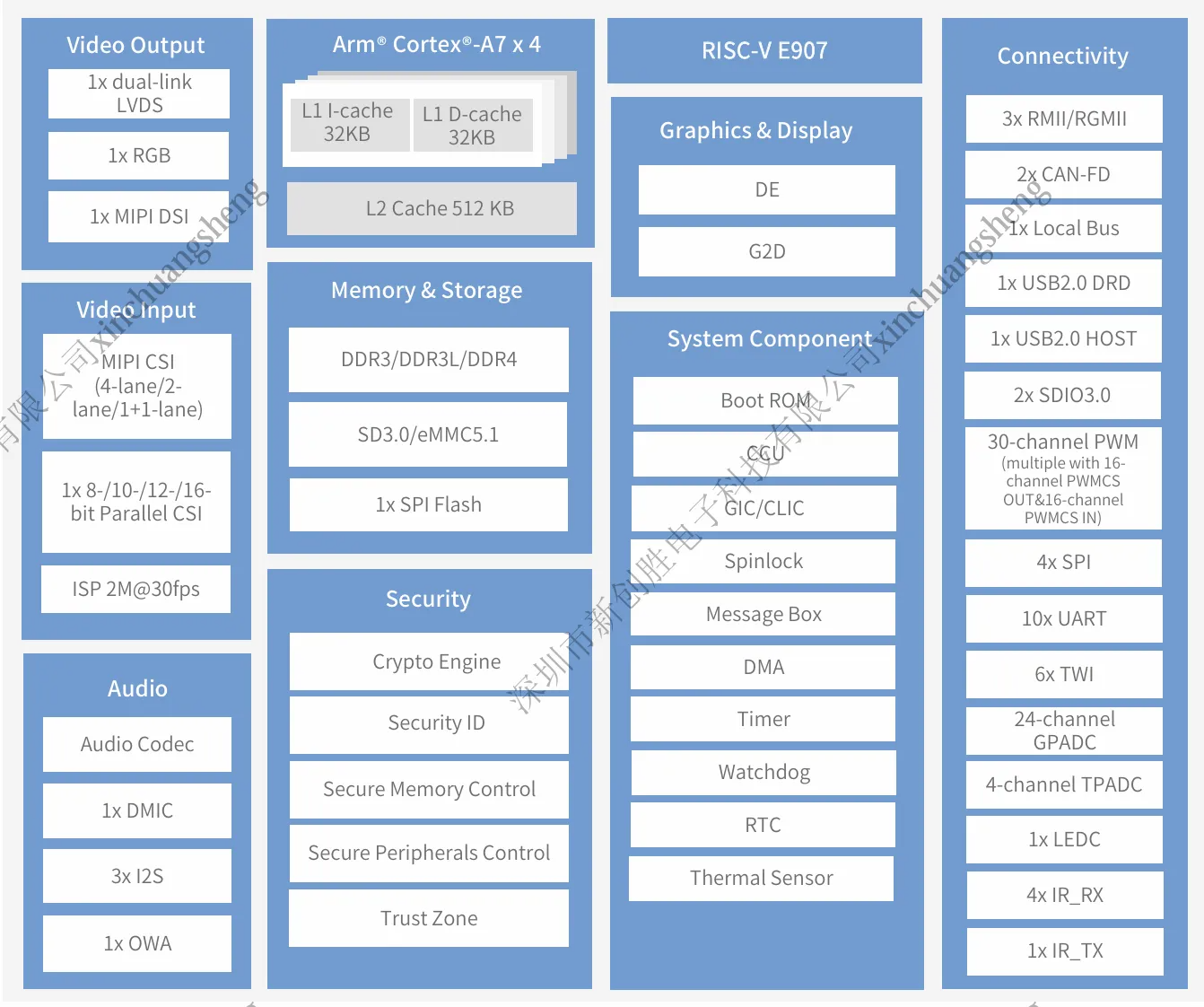
该款SOC的系统框图如下:
三、上电体验
我们将开发板接上适配器上电,并将板卡的电源开关切到开状态,同时接上调试串口(位于TF卡槽与IR头之间的Type-C口),其与电脑相连,电脑会识别为两个串口设备(使用了USB转双UART芯片CH342,将SOC的Debug Serial port接到其中一路了),我们使用第一路,配置波特率为115200,对板卡上电后,开发板烧录的固件在启动后,调试串口有如下打印信息输出:
[242]HELLO! BOOT0 is starting!
[244]BOOT0 commit : {06543bc6-dirty}
[249][pmu]: bus read error
[252]set pll start
[253]set pll end
[255]vaild para:1  select dram para0
[258]ic board init ok
[260]card no is 2
[262]sdcard 2 line count 8
[265][mmc]: mmc driver ver 2025-03-10 09:47
[274][mmc]: Wrong media type 0x0, but host sdc2, try mmc first
[280][mmc]: ***Try MMC card 2***
[303][mmc]: RMCA OK!
[307][mmc]: MMC 5.1
[309][mmc]: HSSDR52/SDR25 8 bit
[312][mmc]: 50000000 Hz
[314][mmc]: 8456 MB
[316][mmc]: ***SD/MMC 2 init OK!!!***
[321]DRAM BOOT DRIVE INFO: V0.16
[324]DRAM use external ZQ
[326]DRAM CLK = 933 MHz
[328]DRAM Type = 3 (3:DDR3,4:DDR4,7:LPDDR3,8:LPDDR4)
[359] Rank0 Dbyte0 delay =  0x0
[362] Rank0 Dbyte0 phy delay =  0x0
[365] Rank0 Dbyte1 delay =  0x0
[368] Rank0 Dbyte1 phy delay =  0x0
[373] Rank0 Dbyte0 delay =  0x48
[376] Rank0 Dbyte0 phy delay =  0x48
[379] Rank0 Dbyte1 delay =  0x45
[382] Rank0 Dbyte1 phy delay =  0x45
[385]DRAM SIZE = 512 MBytes, para1 = 30fa, para2 = 2000001, dram_tpr13 = 8007071
[396]DRAM simple test OK.
[398]dram size = 512
[492]Loading boot-pkg Succeed(index=0).
[496]Entry_name        = u-boot
[506]Entry_name        = optee
[510]tunning data addr:0x435003e8
[513]Jump to OPTEE: optee_base = 0x42900000, uboot_base = 0x43500000
M/TC: OP-TEE version: e9d62ab8 (gcc version 5.3.1 20160412 (Linaro GCC 5.3-2016.05)) #1 Fri Jun 27 02:37:21 UTC 2025 arm
M/TC: OP-TEE 32bit
[00.725]ns16550_serial serial@2600000: pinctrl_select_state_full: uclass_get_device_by_phandle_id: err=-19


U-Boot 2023.04-rc4-gf6c9ec46 (Sep 19 2025 - 12:37:26 +0800) Allwinner Technology
U-Boot bsp-gfd75eab (Sep 19 2025 - 12:37:26 +0800) Allwinner Technology

14/40 CPU:   SUNXI Family
Model: sun8iw22
DRAM:  512 MiB
Working FDT set to 5d640bf0
E/TC:0   fdt_getprop_u32:364 prop trace_level not found
[00.832][mmc]: mmc driver ver uboot2023:2025-04-02 14:45:00
[00.839][mmc]: get sdc_type fail and use default host:tm4.
[00.845][mmc]: SUNXI SDMMC Controller Version:0x50530
[00.852][mmc]: 200 MHz...
[00.854][mmc]: sample: 17 - 147(ps)
[00.858][mmc]: ds: 17 - 147(ps)
[00.860]set_sunxi_flash_curdev...45:cur_sunxi_flash :mmc@04022000.sunxi_flash
SUNXI SD/MMC: 0
Core:  155 devices, 27 uclasses, devicetree: separate
WDT:   Not starting watchdog@0x02050000
MMC:   [00.890][mmc]: mmc 2 cmd timeout 100 status 100
[00.894][mmc]: smc 2 err, cmd 8,  RTO
[00.897][mmc]: mmc 2 close bus gating and reset
[00.902][mmc]: give up reinit
[00.905][mmc]: mmc 2 cmd timeout 100 status 100
[00.909][mmc]: smc 2 err, cmd 55,  RTO
[00.913][mmc]: mmc 2 close bus gating and reset
[00.917][mmc]: give up reinit
[00.940][mmc]: Best spd md: 4-HS400, freq: 4-150000000, Bus width: 8
In:    serial
Out:   serial
Err:   serial
[00.959]skip update boot_param
get 50 probe success
FORLINX: auth pass!
Writing to env...
Net:   [00.984]No ethernet found.
bmp_name=bootlogo.bmp
[01.007]Fail to get reset clk for rst_bus_de_sys
[01.011]Fail to get de's irq!
[01.029]failed to request regulator(power0-supply): -2
[01.034]failed to request regulator(power1-supply): -2
[01.039]failed to request regulator(power2-supply): -2
[01.044]failed to request enable0-gpios GPIO: -2
[01.048]failed to request enable1-gpios GPIO: -2
[01.052]failed to request enable2-gpios GPIO: -2
[01.057]failed to request reset GPIO: -2
[01.060]panel_lvds_probe: Cannot get backlight: -19
[01.067]Using display timing dts
lvds0@0002000:  detailed mode clock 72000 kHz, flags[5]
    H: 1280 1420 1430 1440
    V: 0800 0802 0822 0823
bus_format: 1011
2160122 bytes read in 10 ms (206 MiB/s)
[01.109]no free wb active signal slot
failed to request enable1-gpios
failed to request enable2-gpios
Working FDT set to 42000000
ret 0
[01.391]The storage not support sample function
[01.406]Item0 (Map) magic is bad
[01.409]the secure storage item0 copy0 magic is bad
[01.413]Item0 (Map) magic is bad
[01.416]the secure storage item0 copy1 magic is bad
[01.421]Item0 (Map) magic is bad
Hit any key to stop autoboot (Spacebar):  0
SUNXI AMP: sunxi amp cpu on finish
## Booting Android Image at 0x40007800 ...
Android's image name: sun8i_arm
Kernel load addr 0x40008000 size 7348 KiB
## Flattened Device Tree blob at 42000000
   Booting using the fdt blob at 0x42000000
Working FDT set to 42000000
   XIP Kernel Image
   Using Device Tree in place at 42000000, end 42042fff
Working FDT set to 42000000
[02.845]can`t not get hyper image base in /chosen/hyper
[    0.000000] Booting Linux on physical CPU 0x0
[    0.000000] Linux version 5.10.198 (root@ece33336930b) (arm-linux-gnueabihf-gcc (GCC) 11.3.1 20220604 [releases/gcc-11 revision 591c0f4b92548e3ae2e8173f4f93984b1c7f62bb], GNU ld (Linaro_Binutils-2022.06) 2.37.20220122) #1 SMP PREEMPT Fri Sep 19 11:26:51 CST 2025
[    0.000000] CPU: ARMv7 Processor [410fc075] revision 5 (ARMv7), cr=10c5387d
[    0.000000] CPU: div instructions available: patching division code
[    0.000000] CPU: PIPT / VIPT nonaliasing data cache, VIPT aliasing instruction cache
[    0.000000] OF: fdt: Machine model: sun8iw22
[    0.000000] printk: bootconsole [earlycon0] enabled
[    0.000000] OF: reserved mem: OVERLAP DETECTED!
[    0.000000] arm_rtos_mem_fw@44000000 (0x44000000--0x44200000) overlaps with e907_mem_fw@44000000 (0x44000000--0x44200000)
[    0.000000] AW BSP version: 4483a49eab, 2025-09-11 13:12:43 +0800
[    0.002674] /cpus/cpu@0 missing clock-frequency property
[    0.002737] /cpus/cpu@1 missing clock-frequency property
[    0.007654] /cpus/cpu@2 missing clock-frequency property
[    0.012990] /cpus/cpu@3 missing clock-frequency property
[    0.094259] sunxi:ccu-nglosc not stable, 32K clk will use 16M as parent!
[    0.101333] sunxi:ccu-nglosc not stable, 32K clk will use 16M as parent!
[    0.108394] sunxi:ccu-nglosc not stable, 32K clk will use 16M as parent!
[    0.140243] sunxi:pwmcs-20a0000.pwmcs0:[ERR]: base is 0, num is 8
[    0.141810] sunxi:pwmcs-20b0000.pwmcs1:[ERR]: base is 8, num is 8
[    0.299069] sunxi:sunxi_mmc_host-4022000.sdmmc:[ERR]: manual set ocr
[    0.334876] sunxi:sunxi_mmc_host-4020000.sdmmc:[ERR]: manual set ocr
[    0.369726] sunxi:sunxi_mmc_host-4021000.sdmmc:[ERR]: manual set ocr
[    0.396630] sunxi:sunxi_mmc_host-4021000.sdmmc:[ERR]: smc 2 p1 err, cmd 52, RTO !!
[    0.397467] sunxi:sunxi_mmc_host-4021000.sdmmc:[ERR]: smc 2 p1 err, cmd 52, RTO !!
[    0.400704] sunxi:sunxi_mmc_host-4022000.sdmmc:[ERR]: avoid to switch power_off_notification to POWERED_ON(0x01)
[    0.400711] sunxi:sunxi_mmc_host-4022000.sdmmc:[ERR]: avoid to switch power_off_notification to POWERED_ON(0x01)
[    0.400716] sunxi:sunxi_mmc_host-4022000.sdmmc:[ERR]: avoid to switch power_off_notification to POWERED_ON(0x01)
[    0.400721] sunxi:sunxi_mmc_host-4022000.sdmmc:[ERR]: avoid to switch power_off_notification to POWERED_ON(0x01)
[    0.662051] mdio_bus stmmac-0: MDIO device at address 1 is missing.
[    0.744448] sunxi:irrx-2083000.irrx:[ERR]: sunxi_irrx_resource_get: get ir protocol failed
[    0.804923] sunxi:sunxi_sid:[ERR]: Fail to read 'dvfs2_ori' in dts
[    0.823737] sunxi-can 453c800.can0: can sys reset deasserted
[    0.857182] sunxi:twi-2513000.twi3:[ERR]: drv-mode: Timeout when sending 9th SCL clk
[    0.865834] sunxi:twi-2513000.twi3:[ERR]: drv mode: TWI BUS error state is drv:0x1 eng:0x20
[    0.875237] sunxi:twi-2513000.twi3:[ERR]: drv-mode: xfer failed (dev addr:0x51)
[    0.883431] rtc-pcf8563 3-0051: pcf8563_write_block_data: err=-22 addr=0e, data=03
[    0.891894] rtc-pcf8563 3-0051: pcf8563_probe: write error
[    1.019619] sunxi:twi-2513000.twi3:[ERR]: drv-mode: Timeout when sending 9th SCL clk
[    1.028269] sunxi:twi-2513000.twi3:[ERR]: drv mode: TWI BUS error state is drv:0x1 eng:0x20
[    1.037617] sunxi:twi-2513000.twi3:[ERR]: drv-mode: xfer failed (dev addr:0x14)
[    1.045793] Goodix-TS 3-0014: i2c test failed attempt 1: -22
[    1.089620] sunxi:twi-2513000.twi3:[ERR]: drv-mode: Timeout when sending 9th SCL clk
[    1.098262] sunxi:twi-2513000.twi3:[ERR]: drv mode: TWI BUS error state is drv:0x1 eng:0x20
[    1.107593] sunxi:twi-2513000.twi3:[ERR]: drv-mode: xfer failed (dev addr:0x14)
[    1.115766] Goodix-TS 3-0014: i2c test failed attempt 2: -22
[    1.159578] Goodix-TS 3-0014: I2C communication failure: -22
[    1.180121] debugfs: Directory 'soc@3000000:codec_plat' with parent 'audiocodec' already present!
[    1.193033] debugfs: Directory '2033000.i2s1_plat' with parent 'sndi2s1' already present!
[    1.406714] sunxi-rfkill soc@3000000:rfkill: get gpio chip_en failed
[    1.413871] sunxi-rfkill soc@3000000:rfkill: get gpio power_en failed
[    1.421342] sunxi-rfkill soc@3000000:rfkill: get gpio wlan_regon failed
Starting syslogd: OK
Starting klogd: OK
Running sysctl: OK
Populating /dev using udev: [    1.710766] udevd[151]: specified group 'input' unknown
[    1.717223] udevd[151]: specified group 'kvm' unknown
[    1.734400] udevd[151]: specified group 'xenomai' unknown
done
Initializing random number generator: OK
Saving random seed: OK
Starting system message bus: dbus[264]: Unknown username "pulse" in message bus configuration file
done
Starting iptables: OK
wlan0     Link encap:Ethernet  HWaddr 78:BE:81:20:30:4E
Realtek Bluetooth :Realtek Bluetooth init uart with init speed:115200, type:HCI UART H5
Realtek Bluetooth :Realtek hciattach version 3.1.8c8cc93.20230801-094614

Realtek Bluetooth :Use epoll
Realtek Bluetooth :[SYNC] Get SYNC Resp Pkt
Realtek Bluetooth :[CONFIG] Get SYNC pkt
Realtek Bluetooth :[CONFIG] Get CONFG pkt
Realtek Bluetooth :[CONFIG] Get CONFG resp pkt
Realtek Bluetooth :dic is 1, cfg field 0x14
Realtek Bluetooth :H5 init finished

Realtek Bluetooth :Realtek H5 IC
Starting network: Realtek Bluetooth :Receive cmd complete event of command: fc61
Realtek Bluetooth :LMP Subversion 0xbeef
Realtek Bluetooth :Receive cmd complete event of command: 1001
Realtek Bluetooth :HCI Version 0x08
Realtek Bluetooth :HCI Revision 0x000c
Realtek Bluetooth :LMP Subversion 0x8821
bluetoothd[274]: Bluetooth daemon 5.54
Realtek Bluetooth :Receive cmd complete event of command: fc6d
Realtek Bluetooth :Read ROM version 01
Realtek Bluetooth :LMP Subversion 0x8821
Realtek Bluetooth :EVersion 1
Realtek Bluetooth :IC: RTL8821CS
Realtek Bluetooth :Firmware/config: rtl8821c_fw, rtl8821c_config
Realtek Bluetooth :Couldnt open extra config /opt/rtk_btconfig.txt, No such file or directory
Realtek Bluetooth :Couldnt open BT MAC file /opt/bdaddr, No such file or directory
Realtek Bluetooth :Origin cfg len 41
Realtek Bluetooth :55 ab 23 87 23 00 0c 00 10 02 80 92 04 50 c5 ea
Realtek Bluetooth :19 e1 1b fd af 5f 01 a4 0b d9 00 01 0f e4 00 01
Realtek Bluetooth :08 8d 00 01 fa 8f 00 01 bf
Realtek Bluetooth :Config baudrate: 04928002
Realtek Bluetooth :uart flow ctrl: 1
Realtek Bluetooth :Vendor baud from Config file: 04928002
Realtek Bluetooth :New cfg len 41
Realtek Bluetooth :55 ab 23 87 23 00 0c 00 10 02 80 92 04 50 c5 ea
Realtek Bluetooth :19 e1 1b fd af 5f 01 a4 0b d9 00 01 0f e4 00 01
Realtek Bluetooth :08 8d 00 01 fa 8f 00 01 bf
Realtek Bluetooth :Load FW /lib/firmware/rtlbt/rtl8821c_fw OK, size 54892
Realtek Bluetooth :rtb_get_fw_project_id: opcode 0, len 1, data 10
Realtek Bluetooth :FW version 0x0bc6d607, Patch num 2
Realtek Bluetooth :Chip id 0x0001
Realtek Bluetooth :Chip id 0x0002
Realtek Bluetooth :Patch length 0x8964
Realtek Bluetooth :Start offset 0x00004cc0
Realtek Bluetooth :Svn version: 199569780
Realtek Bluetooth :Coexistence: BTCOEX_20220309-5b5b

Realtek Bluetooth :FW  exists, Config file  exists
Realtek Bluetooth :Total len 35213 for fwc
Realtek [    3.797602] udevd[152]: specified group 'input' unknown
Bluetooth :baudrate in change sp[    3.806188] udevd[152]: specified group 'kvm' unknown
eed command: 0x02 0x80 0x92 0x04
bluetoothd[274]: Starting SDP server
bluetoothd[274]: Failed [    3.819123] udevd[152]: specified group 'xenomai' unknown
to init battery plugin
Realtek Bluetooth :Receive cmd complete event of command: fc17
Realtek Bluetooth :Received cc of vendor change baud
bluetoothd[274]: Bluetooth management interface 1.18 initialized
Realtek Bluetooth :Final speed 1500000
Realtek Bluetooth :end_idx: 139, lp_len: 185, additional pkts: 7

Realtek Bluetooth :Start downloading...
OK
starting weston... done.
Starting matrix-browser: Date: 2025-12-29 CST
[05:14:45.601] weston 10.0.0
               https://wayland.freedesktop.org
               Bug reports to: https://gitlab.freedesktop.org/wayland/weston/issues/
               Build: 10.0.0
[05:14:45.601] Command line: /usr/bin/weston --backend=drm-backend.so --tty=1 --use-pixman
[05:14:45.601] OS: Linux, 5.10.198, #1 SMP PREEMPT Fri Sep 19 11:26:51 CST 2025, armv7l
[05:14:45.601] Flight recorder: enabled
[05:14:45.601] warning: XDG_RUNTIME_DIR "/var/run" is not configured
correctly.  Unix access mode must be 0700 (current mode is 0755),
and must be owned by the user UID 0 (current owner is UID 0).
Refer to your distribution on how to get it, or
http://www.freedesktop.org/wiki/Specifications/basedir-spec
on how to implement it.
[05:14:45.603] Using config file '/etc/xdg/weston/weston.ini'
[05:14:45.603] Output repaint window is -1 ms maximum.
[05:14:45.604] Loading module '/usr/lib/libweston-10/drm-backend.so'
[05:14:45.606] initializing drm backend
[05:14:45.606] Trying weston_launch launcher...
[05:14:45.606] could not get launcher fd from env
[05:14:45.606] Trying direct launcher...
[05:14:45.608] using /dev/dri/card0
[05:14:45.608] DRM: supports atomic modesetting
[05:14:45.608] DRM: supports GBM modifiers
[05:14:45.608] DRM: supports picture aspect ratio
[05:14:45.608] couldn't fstat launcher tty: Bad file descriptor
[05:14:45.627] event0  - sunxi_ir_recv: is tagged by udev as: Keyboard Pointingstick Joystick
[05:14:45.628] event0  - sunxi_ir_recv: device is a pointer
[05:14:45.628] event0  - sunxi_ir_recv: device is a keyboard
[05:14:45.629] event1  - sunxi-gpadc2/channel0/input0: not tagged as supported input device
Realtek Bluetooth :Send additional packet 13
Realtek Bluetooth :Send additional packet 14
Realtek Bluetooth :Send additional packet 15
Realtek Bluetooth :Send additional packet 16
Realtek Bluetooth :Send additional packet 17
Realtek Bluetooth :Send additional packet 18
Realtek Bluetooth :Last packet 147
Realtek Bluetooth :Send last pkt
Realtek Bluetooth :Enable host hw flow control
[05:14:45.729] event1  - not using input device '/dev/input/event1'
[05:14:45.731] event2  - sunxi-gpadc2/channel1/input0: not tagged as supported input device
[05:14:45.829] event2  - not using input device '/dev/input/event2'
[05:14:45.831] event3  - sunxi-gpadc2/channel2/input0: not tagged as supported input device
[05:14:45.929] event3  - not using input device '/dev/input/event3'
[05:14:45.931] event4  - sunxi-gpadc2/channel3/input0: not tagged as supported input device
[05:14:46.009] event4  - not using input device '/dev/input/event4'
[05:14:46.011] event6  - audiocodec Headphones: is tagged by udev as: Keyboard Switch
[05:14:46.011] event6  - audiocodec Headphones: device is a keyboard
[05:14:46.013] event5  - soc@3000000:gpio-keys: is tagged by udev as: Keyboard
[05:14:46.013] event5  - soc@3000000:gpio-keys: device is a keyboard
Realtek Bluetooth :h5_hci_reset: Issue hci reset cmd
Realtek Bluetooth :Receive cmd complete event of command: 0c03
Realtek Bluetooth :Received cc of hci reset cmd
Realtek Bluetooth :Init Process finished
Realtek Bluetooth :Realtek Bluetooth post process
Realtek Bluetooth :Device setup complete
[05:14:46.062] libinput: configuring device "sunxi_ir_recv".
[05:14:46.062] libinput: configuring device "audiocodec Headphones".
[05:14:46.062] libinput: configuring device "soc@3000000:gpio-keys".
[05:14:46.064] DRM: head 'LVDS-1' updated, connector 115 is connected, EDID make 'unknown', model 'unknown', serial 'unknown'
[05:14:46.065] DRM: head 'LVDS-1' found, connector 115 is connected, EDID make 'unknown', model 'unknown', serial 'unknown'
[05:14:46.065] Registered plugin API 'weston_drm_output_api_v1' of size 12
[05:14:46.065] Color manager: no-op
[05:14:46.065] Output 'LVDS-1' using color profile: built-in default sRGB SDR profile
[05:14:46.071] DRM: output LVDS-1 uses shadow framebuffer.
[05:14:46.071] Output LVDS-1 (crtc 100) video modes:
               1280x800@60.8, preferred, current, 72.0 MHz
[05:14:46.071] associating input device event0 with output LVDS-1 (none by udev)
[05:14:46.071] associating input device event6 with output LVDS-1 (none by udev)
[05:14:46.071] associating input device event5 with output LVDS-1 (none by udev)
[05:14:46.071] Output 'LVDS-1' enabled with head(s) LVDS-1
[05:14:46.072] Compositor capabilities:
               arbitrary surface rotation: yes
               screen capture uses y-flip: no
               cursor planes: yes
               arbitrary resolutions: no
               view mask clipping: yes
               explicit sync: no
               color operations: no
               presentation clock: CLOCK_MONOTONIC, id 1
               presentation clock resolution: 0.000000001 s
[05:14:46.073] Loading module '/usr/lib/weston/desktop-shell.so'
[05:14:46.075] launching '/usr/libexec/weston-keyboard'
[05:14:46.077] Note: support for the deprecated wl_shell interface is disabled. If a legacy client still needs it, it can be re-enabled by passing -Ddeprecated-wl-shell=true to Meson when building Weston.
[05:14:46.077] launching '/usr/libexec/weston-desktop-shell'
OK
could not load cursor 'dnd-move'
could not load cursor 'dnd-copy'
could not load cursor 'dnd-none'
could not load cursor 'dnd-move'
could not load cursor 'dnd-copy'
could not load cursor 'dnd-none'
usb0 current mode:
Starting adb: OK
init adb main
Handling main()
Starting lighttpd: OK
Starting sshd: OK
/dev/by-name/UDISK already format
Starting vsftpd: OK
Trying to connect to SWUpdate...
boot total use 9498 ms
root@OKT153:/# swu_param: ####
swu_software: ####
swu_mode: ####
no swupdate_cmd to run, wait for next swupdate

root@OKT153:/#
root@OKT153:/#
至此,飞凌OK153-S开发板的开箱体验结束,接下来还有关于该开发板的进一步体验会整理出来跟大家分享。同时,也请大家关注我们的微信公众号(X的嵌入式AI),二维码如下: