Navigation

    全志在线开发者论坛

    • Register
    • Login
    • Search
    • Categories
    • Tags
    • 在线文档
    • 社区主页

    全志D1哪吒开发板 frambuffer 测试

    MR Series
    2
    3
    2897
    Loading More Posts
    • Oldest to Newest
    • Newest to Oldest
    • Most Votes
    Reply
    • Reply as topic
    Log in to reply
    This topic has been deleted. Only users with topic management privileges can see it.
    • M
      memory LV 7 last edited by whycan

      5af8a2d7-d5aa-47d6-9876-d555cf452686-image.png

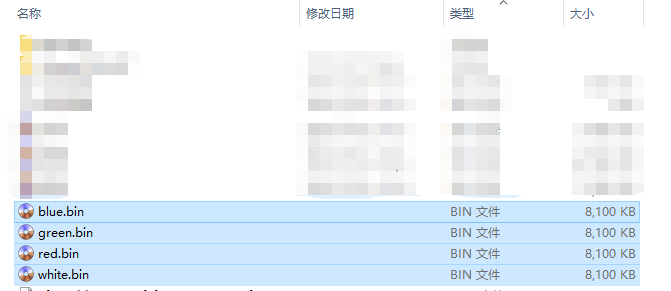
      红绿蓝三色文件白色文件: nezha_d1_fb_test_rgb_white.7z

      里面有四个文件:

      red.bin
      green.bin
      blue.bin
      white.bin
      

      测试方法:

      cat red.bin > /dev/fb0
      

      这样, 你的 hdmi 显示器就显示对应的纯 红/绿/蓝/白 色了。

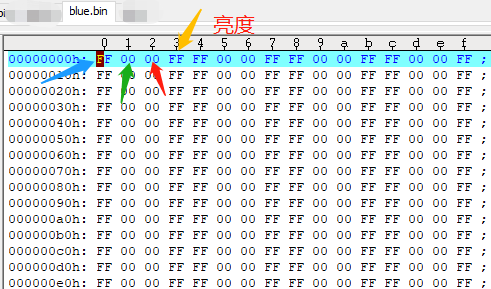
      57c1da68-84b2-45d5-b9f3-d645dc7cda39-image.png

      颜色排布结构

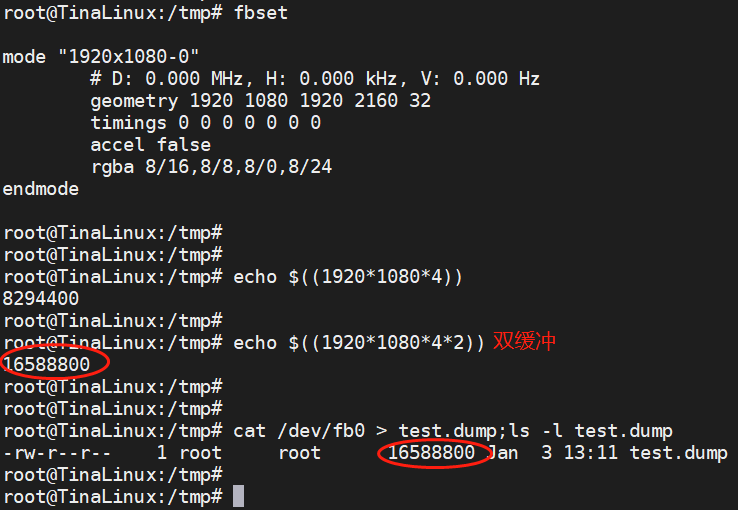
      root@TinaLinux:/tmp#
      root@TinaLinux:/tmp# fbset
      
      mode "1920x1080-0"
              # D: 0.000 MHz, H: 0.000 kHz, V: 0.000 Hz
              geometry 1920 1080 1920 2160 32
              timings 0 0 0 0 0 0 0
              accel false
              rgba 8/16,8/8,8/0,8/24
      endmode
      
      root@TinaLinux:/tmp#
      root@TinaLinux:/tmp#
      root@TinaLinux:/tmp# echo $((1920*1080*4))
      8294400
      root@TinaLinux:/tmp#
      root@TinaLinux:/tmp# echo $((1920*1080*4*2))
      16588800
      root@TinaLinux:/tmp#
      root@TinaLinux:/tmp#
      root@TinaLinux:/tmp# cat /dev/fb0 > test.dump;ls -l test.dump
      -rw-r--r--    1 root     root      16588800 Jan  3 13:11 test.dump
      root@TinaLinux:/tmp#
      root@TinaLinux:/tmp#
      

      25722902-2eb0-4c6c-a881-a0fd2df54f56-image.png

      1 Reply Last reply Reply Quote Share 0
      • M
        memory LV 7 last edited by

        通过这个测试,总算搞明白了,前面为什么移植 ucgui 和 infones 的 framebuffer 总是没显示了。

        因为alpha 通道也是需要数据的,如果apha为零,屏幕就是黑的。

        1 Reply Last reply Reply Quote Share 0
        • Referenced by  Y yixiuge 
        • WhycanService
          WhycanService LV 8 last edited by

          rm red.bin -rf && while [ 1 ]; do echo -n -e "\x00\x00\xff\xff" >> red.bin; done;
          
          rm blue.bin -rf && while [ 1 ]; do echo -n -e "\xff\x00\x00\xff" >> blue.bin; done;
          
          rm green.bin -rf && while [ 1 ]; do echo -n -e "\x00\xff\x00\xff" >> green.bin; done;

          
          1 Reply Last reply Reply Quote Share 0
          • 1 / 1
          • First post
            Last post

          Copyright © 2024 深圳全志在线有限公司 粤ICP备2021084185号 粤公网安备44030502007680号

          行为准则 | 用户协议 | 隐私权政策