Navigation

    全志在线开发者论坛

    • Register
    • Login
    • Search
    • Categories
    • Tags
    • 在线文档
    • 社区主页

    V821 烧录,驱动一直识别错误,如何解决

    V Series
    3
    5
    1984
    Loading More Posts
    • Oldest to Newest
    • Newest to Oldest
    • Most Votes
    Reply
    • Reply as topic
    Log in to reply
    This topic has been deleted. Only users with topic management privileges can see it.
    • L
      lxq_69697769 LV 3 last edited by

      如题,

      按住FEL键后上电,设备管理器一直提示驱动错误,实际上个人电脑已安装驱动“全志USB烧录驱动20201229.zip”,如何解决?

      具体错误信息如下:
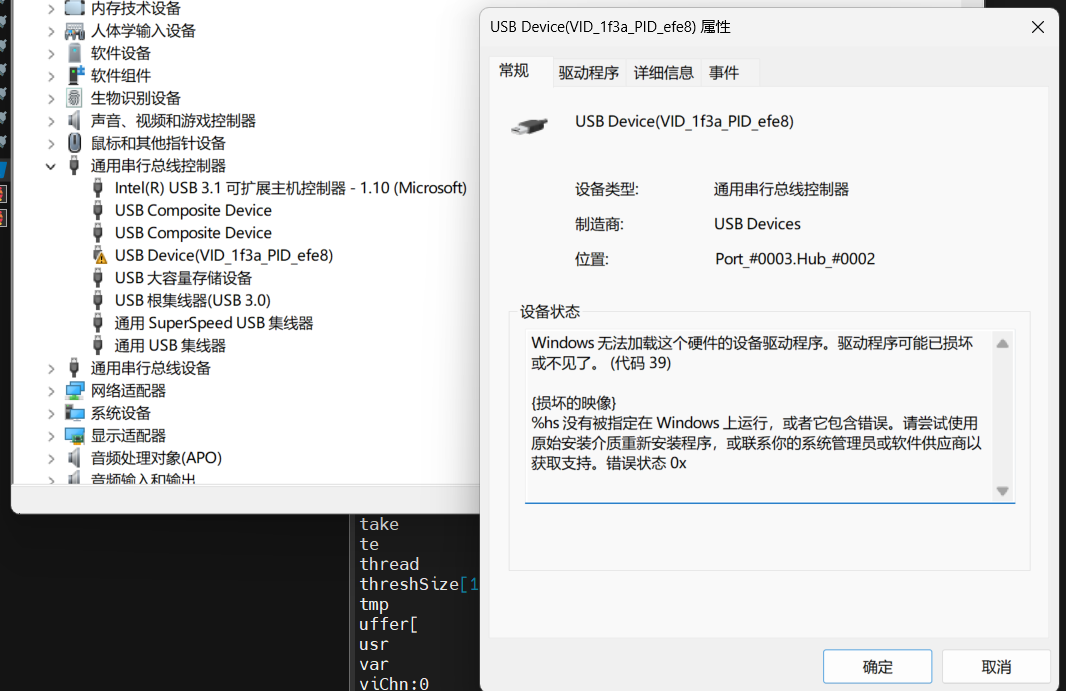
      caf1847a-a3e2-448c-be23-400ce19006db-image.png

      W I 2 Replies Last reply Reply Quote Share 0
      • W
        wyljkl LV 7 @lxq_69697769 last edited by

        @lxq_69697769 Windows10???禁用一下设备驱动签名,百度一下都有教程

        L 1 Reply Last reply Reply Quote Share 0
        • I
          indream LV 5 @lxq_69697769 last edited by

          @lxq_69697769 win11的话,要关闭内存完整性功能,需要进入“Windows 安全中心”的“设备安全性”部分,然后找到“内核隔离”并关闭“内存完整性”开关。

          L 1 Reply Last reply Reply Quote Share 1
          • L
            lxq_69697769 LV 3 @indream last edited by

            @indream 在 V821 烧录,驱动一直识别错误,如何解决 中说:

            @lxq_69697769 win11的话,要关闭内存完整性功能,需要进入“Windows 安全中心”的“设备安全性”部分,然后找到“内核隔离”并关闭“内存完整性”开关。

            这个方法正解,关闭“内存完整性”,驱动就识别正常且可以烧录了

            1 Reply Last reply Reply Quote Share 0
            • L
              lxq_69697769 LV 3 @wyljkl last edited by

              @wyljkl win11,楼下的解决方法可以解决驱动识别异常的问题

              1 Reply Last reply Reply Quote Share 0
              • 1 / 1
              • First post
                Last post

              Copyright © 2024 深圳全志在线有限公司 粤ICP备2021084185号 粤公网安备44030502007680号

              行为准则 | 用户协议 | 隐私权政策