飞凌 OK153-S 开发板试用:接口获取 USB 摄像头的 数据帧并转换为BMP图片
-
上一篇使用飞凌 OK153-S 开发板 外接一个 usb摄像头,获取摄像头的YUYV数据,由于YUYV数据不太友好,需要专门的播放器,所以我们进一步把他转换为BMP格式,直接打开可以浏览,下一步我们直接显示到LCD上,最后我们会形成视频流直接显示到显示屏上
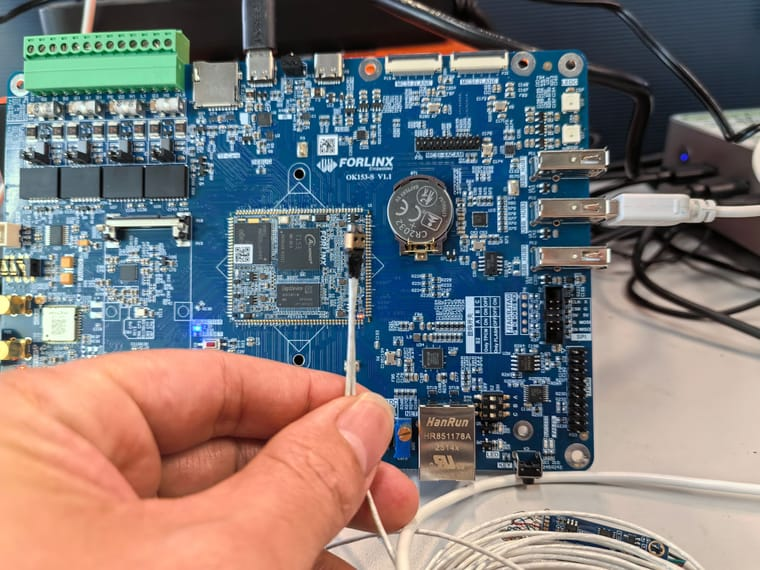
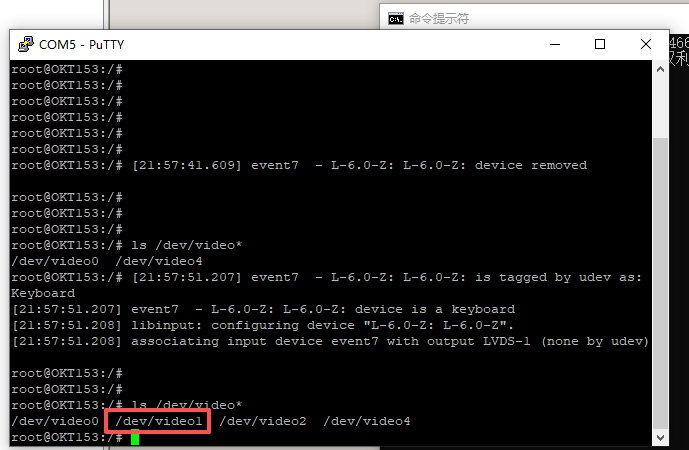
插上USB接口,对应的节点,/dev/video1
======================================================
代码如下(v4l2_yuyv_to_bmp.c):
#include <stdio.h>
#include <stdlib.h>
#include <string.h>
#include <fcntl.h>
#include <unistd.h>
#include <errno.h>
#include <sys/mman.h>
#include <sys/ioctl.h>
#include <linux/videodev2.h>
#include <math.h>// 配置参数(可根据摄像头支持情况修改)
#define DEVICE_PATH "/dev/video0" // 摄像头设备节点
#define WIDTH 640 // 图像宽度
#define HEIGHT 480 // 图像高度
#define BUFFER_COUNT 4 // 缓冲区数量(推荐2-4个)// BMP文件核心结构体(强制紧凑对齐,避免编译器自动填充字节)
#pragma pack(1)
// BMP文件头(14字节)
typedef struct {
unsigned short bfType; // BMP标识,必须为0x4D42('BM')
unsigned int bfSize; // BMP文件总大小(字节)
unsigned short bfReserved1; // 保留字段,设为0
unsigned short bfReserved2; // 保留字段,设为0
unsigned int bfOffBits; // 像素数据起始偏移(文件头+信息头=54字节)
} BMPFileHeader;// BMP信息头(40字节)
typedef struct {
unsigned int biSize; // 信息头大小,设为40
int biWidth; // 图像宽度(像素)
int biHeight; // 图像高度(像素,正数表示倒序存储)
unsigned short biPlanes; // 色彩平面数,设为1
unsigned short biBitCount; // 位深,24位真彩色设为24
unsigned int biCompression; // 压缩方式,无压缩设为0
unsigned int biSizeImage; // 像素数据大小(含行对齐填充)
int biXPelsPerMeter;// 水平分辨率,设为0
int biYPelsPerMeter;// 垂直分辨率,设为0
unsigned int biClrUsed; // 颜色表使用数量,24位设为0
unsigned int biClrImportant;// 重要颜色数量,24位设为0
} BMPInfoHeader;
#pragma pack()// 缓冲区结构体,保存映射后的地址和长度
typedef struct {
void *start;
size_t length;
} BufferInfo;BufferInfo *buffers = NULL; // 缓冲区数组
// 错误处理辅助函数
static void err_exit(const char *msg) {
perror(msg);
exit(EXIT_FAILURE);
}// 打开视频设备
static int open_video_device(const char *dev_path) {
int fd = open(dev_path, O_RDWR | O_NONBLOCK, 0); // O_NONBLOCK:非阻塞模式
if (fd == -1) {
err_exit("Failed to open video device");
}
return fd;
}// 查询设备是否支持视频捕获和YUYV格式
static void check_device_capability(int fd) {
struct v4l2_capability cap;
if (ioctl(fd, VIDIOC_QUERYCAP, &cap) == -1) {
err_exit("Failed to query device capability");
}// 检查是否支持视频捕获(摄像头属于视频输入设备) if (!(cap.capabilities & V4L2_CAP_VIDEO_CAPTURE)) { fprintf(stderr, "Device does not support video capture\n"); exit(EXIT_FAILURE); } // 检查是否支持内存映射方式(高效获取帧数据) if (!(cap.capabilities & V4L2_CAP_STREAMING)) { fprintf(stderr, "Device does not support streaming I/O\n"); exit(EXIT_FAILURE); }}
// 设置视频格式为YUYV
static void set_video_format(int fd) {
struct v4l2_format fmt;
memset(&fmt, 0, sizeof(fmt));
fmt.type = V4L2_BUF_TYPE_VIDEO_CAPTURE;
fmt.fmt.pix.width = WIDTH;
fmt.fmt.pix.height = HEIGHT;
fmt.fmt.pix.pixelformat = V4L2_PIX_FMT_YUYV; // 设置为YUYV格式
fmt.fmt.pix.field = V4L2_FIELD_NONE; // 无场(逐行扫描)if (ioctl(fd, VIDIOC_S_FMT, &fmt) == -1) { err_exit("Failed to set video format"); } // 验证实际设置的格式(摄像头可能会调整分辨率) if (fmt.fmt.pix.width != WIDTH || fmt.fmt.pix.height != HEIGHT) { printf("Warning: Device adjusted resolution to %dx%d\n", fmt.fmt.pix.width, fmt.fmt.pix.height); } if (fmt.fmt.pix.pixelformat != V4L2_PIX_FMT_YUYV) { fprintf(stderr, "Device does not support YUYV format\n"); exit(EXIT_FAILURE); }}
// 请求并分配内核缓冲区
static void request_buffers(int fd) {
struct v4l2_requestbuffers req;
memset(&req, 0, sizeof(req));
req.count = BUFFER_COUNT;
req.type = V4L2_BUF_TYPE_VIDEO_CAPTURE;
req.memory = V4L2_MEMORY_MMAP; // 使用内存映射方式if (ioctl(fd, VIDIOC_REQBUFS, &req) == -1) { err_exit("Failed to request buffers"); } if (req.count != BUFFER_COUNT) { fprintf(stderr, "Device only allocated %d buffers (requested %d)\n", req.count, BUFFER_COUNT); exit(EXIT_FAILURE); } // 分配缓冲区数组内存 buffers = (BufferInfo *)malloc(req.count * sizeof(BufferInfo)); if (!buffers) { err_exit("Failed to allocate buffer info array"); }}
// 将内核缓冲区映射到用户空间
static void mmap_buffers(int fd) {
for (int i = 0; i < BUFFER_COUNT; i++) {
struct v4l2_buffer buf;
memset(&buf, 0, sizeof(buf));
buf.type = V4L2_BUF_TYPE_VIDEO_CAPTURE;
buf.memory = V4L2_MEMORY_MMAP;
buf.index = i;// 查询缓冲区信息 if (ioctl(fd, VIDIOC_QUERYBUF, &buf) == -1) { err_exit("Failed to query buffer"); } // 内存映射 buffers[i].length = buf.length; buffers[i].start = mmap(NULL, buf.length, PROT_READ | PROT_WRITE, // 可读可写 MAP_SHARED, // 共享映射(内核/用户空间共享) fd, buf.m.offset); if (buffers[i].start == MAP_FAILED) { err_exit("Failed to mmap buffer"); } // 将缓冲区放入输入队列(准备捕获数据) if (ioctl(fd, VIDIOC_QBUF, &buf) == -1) { err_exit("Failed to queue buffer"); } }}
// 启动视频流捕获
static void start_stream(int fd) {
enum v4l2_buf_type buf_type = V4L2_BUF_TYPE_VIDEO_CAPTURE;
if (ioctl(fd, VIDIOC_STREAMON, &buf_type) == -1) {
err_exit("Failed to start stream");
}
}// 核心转换:YUYV数据转RGB24数据
static void yuyv_to_rgb24(const unsigned char *yuyv_data,
unsigned char *rgb24_data,
int width, int height) {
int yuyv_stride = width * 2; // YUYV每行字节数
int rgb24_stride = width * 3; // RGB24每行字节数(未对齐)
// 计算BMP行对齐后的字节数(必须是4的整数倍)
int bmp_rgb_stride = (rgb24_stride + 3) & ~3;// 遍历YUYV数据(按行倒序,满足BMP存储要求:从左下角开始) for (int y = height - 1; y >= 0; y--) { const unsigned char *yuyv_row = yuyv_data + y * yuyv_stride; unsigned char *rgb_row = rgb24_data + (height - 1 - y) * bmp_rgb_stride; // 遍历每行像素对(YUYV每2个像素占4字节) for (int x = 0; x < width; x += 2) { // 提取YUYV数据:Y0 U0 Y1 V0 unsigned char Y0 = yuyv_row[x * 2]; unsigned char U0 = yuyv_row[x * 2 + 1]; unsigned char Y1 = yuyv_row[x * 2 + 2]; unsigned char V0 = yuyv_row[x * 2 + 3]; // 颜色空间转换(公式实现) float u = U0 - 128.0f; float v = V0 - 128.0f; // 转换第一个像素(Y0 U0 V0 → R0 G0 B0) float R0 = Y0 + 1.402f * v; float G0 = Y0 - 0.34414f * u - 0.71414f * v; float B0 = Y0 + 1.772f * u; // 转换第二个像素(Y1 U0 V0 → R1 G1 B1) float R1 = Y1 + 1.402f * v; float G1 = Y1 - 0.34414f * u - 0.71414f * v; float B1 = Y1 + 1.772f * u; // 裁剪到0~255区间,避免颜色溢出错乱 rgb_row[x * 3] = (unsigned char)(B0 < 0 ? 0 : (B0 > 255 ? 255 : B0)); // B rgb_row[x * 3 + 1] = (unsigned char)(G0 < 0 ? 0 : (G0 > 255 ? 255 : G0)); // G rgb_row[x * 3 + 2] = (unsigned char)(R0 < 0 ? 0 : (R0 > 255 ? 255 : R0)); // R rgb_row[x * 3 + 3] = (unsigned char)(B1 < 0 ? 0 : (B1 > 255 ? 255 : B1)); // B rgb_row[x * 3 + 4] = (unsigned char)(G1 < 0 ? 0 : (G1 > 255 ? 255 : G1)); // G rgb_row[x * 3 + 5] = (unsigned char)(R1 < 0 ? 0 : (R1 > 255 ? 255 : R1)); // R } }}
// 保存RGB24数据为BMP文件
static void save_rgb24_to_bmp(const unsigned char *rgb24_data,
int width, int height,
const char *bmp_path) {
// 1. 计算BMP相关参数
int rgb24_stride = width * 3;
int bmp_rgb_stride = (rgb24_stride + 3) & ~3; // 行对齐(4的整数倍)
int bmp_pixel_size = bmp_rgb_stride * height; // 像素数据总大小(含填充)
int bmp_total_size = sizeof(BMPFileHeader) + sizeof(BMPInfoHeader) + bmp_pixel_size;// 2. 初始化BMP文件头 BMPFileHeader bmp_file_header = {0}; bmp_file_header.bfType = 0x4D42; // 'BM'标识 bmp_file_header.bfSize = bmp_total_size; bmp_file_header.bfOffBits = sizeof(BMPFileHeader) + sizeof(BMPInfoHeader); // 3. 初始化BMP信息头 BMPInfoHeader bmp_info_header = {0}; bmp_info_header.biSize = sizeof(BMPInfoHeader); bmp_info_header.biWidth = width; bmp_info_header.biHeight = height; bmp_info_header.biPlanes = 1; bmp_info_header.biBitCount = 24; bmp_info_header.biCompression = 0; // 无压缩 bmp_info_header.biSizeImage = bmp_pixel_size; // 4. 打开文件并写入数据 FILE *fp = fopen(bmp_path, "wb"); if (!fp) { err_exit("Failed to open BMP output file"); } // 写入文件头和信息头 fwrite(&bmp_file_header, sizeof(BMPFileHeader), 1, fp); fwrite(&bmp_info_header, sizeof(BMPInfoHeader), 1, fp); // 写入像素数据(含行对齐填充) fwrite(rgb24_data, bmp_pixel_size, 1, fp); fclose(fp); printf("BMP image saved to %s\n", bmp_path);}
// 获取一帧YUYV格式数据,保存为.yuv文件并转换为.bmp文件
static void capture_one_frame(int fd) {
struct v4l2_buffer buf;
fd_set fds;
struct timeval tv;
int ret;// 等待缓冲区就绪(非阻塞模式下需要轮询或select) FD_ZERO(&fds); FD_SET(fd, &fds); tv.tv_sec = 5; // 超时时间5秒 tv.tv_usec = 0; ret = select(fd + 1, &fds, NULL, NULL, &tv); if (ret == -1) { err_exit("Failed to select"); } else if (ret == 0) { fprintf(stderr, "Select timeout (no frame captured)\n"); exit(EXIT_FAILURE); } // 从输出队列取出就绪的缓冲区 memset(&buf, 0, sizeof(buf)); buf.type = V4L2_BUF_TYPE_VIDEO_CAPTURE; buf.memory = V4L2_MEMORY_MMAP; if (ioctl(fd, VIDIOC_DQBUF, &buf) == -1) { // 忽略临时的EAGAIN错误(缓冲区尚未就绪) if (errno != EAGAIN) { err_exit("Failed to dequeue buffer"); } return; } // 验证帧数据大小(YUYV格式应为 宽×高×2) printf("Captured frame: index=%d, length=%zu, expected=%d\n", buf.index, buf.bytesused, WIDTH * HEIGHT * 2); // 步骤1:保存原始YUYV文件 FILE *fp_yuyv = fopen("capture_yuyv.yuv", "wb"); if (!fp_yuyv) { err_exit("Failed to open YUYV output file"); } fwrite(buffers[buf.index].start, 1, buf.bytesused, fp_yuyv); fclose(fp_yuyv); printf("YUYV frame saved to capture_yuyv.yuv\n"); // 步骤2:YUYV转换为BMP int rgb24_stride = WIDTH * 3; int bmp_rgb_stride = (rgb24_stride + 3) & ~3; // 行对齐 int bmp_pixel_size = bmp_rgb_stride * HEIGHT; // 分配RGB24缓冲区(存储转换后的数据) unsigned char *rgb24_data = (unsigned char *)malloc(bmp_pixel_size); if (!rgb24_data) { err_exit("Failed to allocate RGB24 buffer"); } memset(rgb24_data, 0, bmp_pixel_size); // 执行YUYV→RGB24转换 yuyv_to_rgb24((const unsigned char *)buffers[buf.index].start, rgb24_data, WIDTH, HEIGHT); // 保存为BMP文件 save_rgb24_to_bmp(rgb24_data, WIDTH, HEIGHT, "capture_yuyv.bmp"); // 释放RGB24缓冲区 free(rgb24_data); // 将缓冲区重新放入输入队列,继续捕获后续帧(如需连续捕获) if (ioctl(fd, VIDIOC_QBUF, &buf) == -1) { err_exit("Failed to requeue buffer"); }}
// 停止视频流捕获
static void stop_stream(int fd) {
enum v4l2_buf_type buf_type = V4L2_BUF_TYPE_VIDEO_CAPTURE;
if (ioctl(fd, VIDIOC_STREAMOFF, &buf_type) == -1) {
err_exit("Failed to stop stream");
}
}// 解除内存映射并释放资源
static void cleanup_resources(int fd) {
// 解除映射
for (int i = 0; i < BUFFER_COUNT; i++) {
if (munmap(buffers[i].start, buffers[i].length) == -1) {
err_exit("Failed to unmap buffer");
}
}// 释放缓冲区数组 free(buffers); buffers = NULL; // 关闭设备 close(fd);}
int main() {
int fd = -1;// 执行完整捕获+转换流程 fd = open_video_device(DEVICE_PATH); check_device_capability(fd); set_video_format(fd); request_buffers(fd); mmap_buffers(fd); start_stream(fd); capture_one_frame(fd); stop_stream(fd); cleanup_resources(fd); return EXIT_SUCCESS;}
===================================================
虚拟机中编译:/opt/arm-buildroot-linux-gnueabihf_sdk-buildroot/bin/arm-linux-gnueabihf-gcc v4l2_yuyv_to_bmp.c -o v4l2_yuyv_to_bmp -lm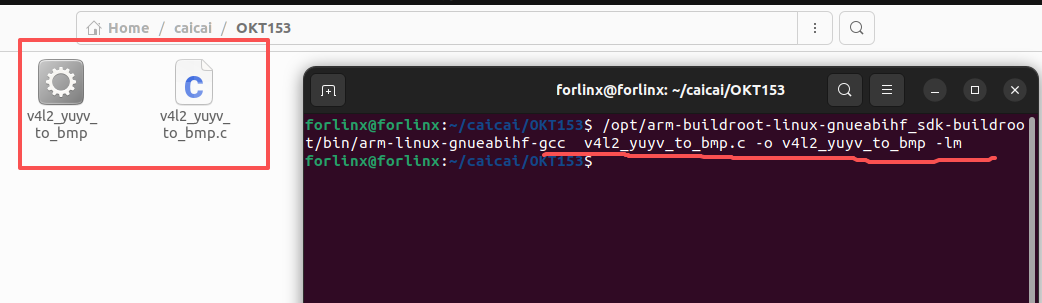
拷贝v4l2_yuyv_to_bmp到OK153上运行
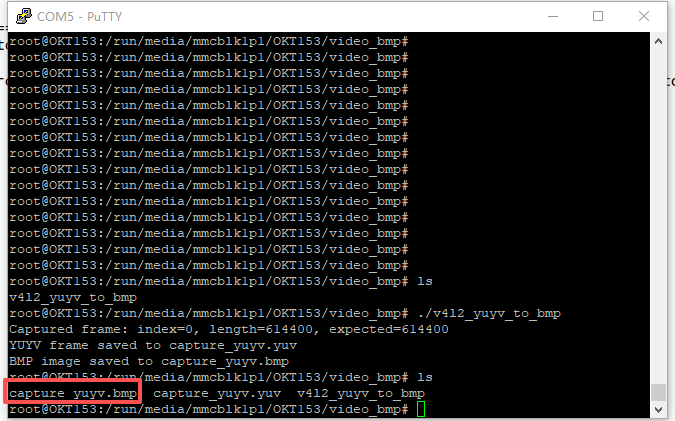
这个时候生成的图片capture_yuyv.bmp可以copy到windows中直接打开了
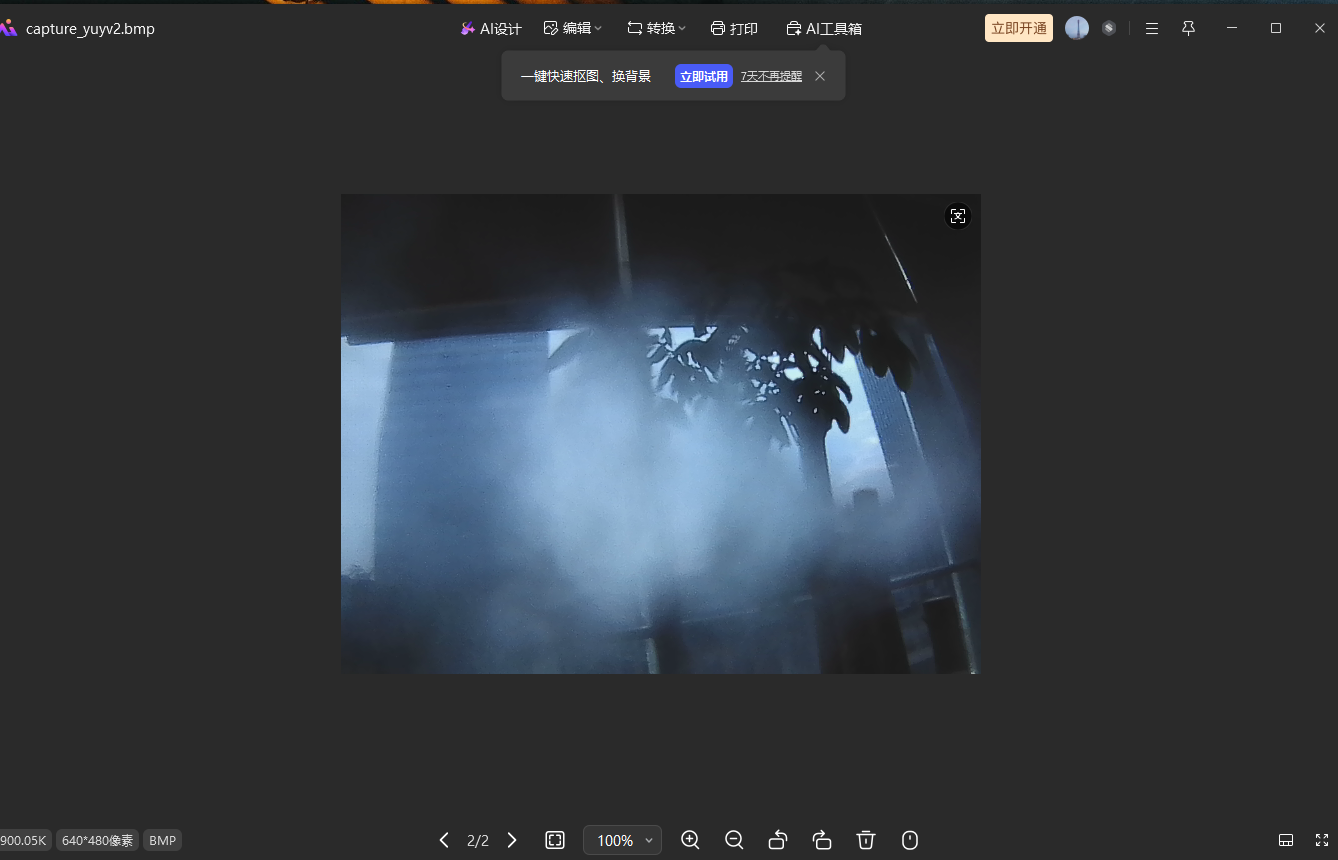
完毕,后面我们再把这张图片显示到屏幕上
Copyright © 2024 深圳全志在线有限公司 粤ICP备2021084185号 粤公网安备44030502007680号