使用tinyvision制作简单的网络摄像机IPC
-
前言
静谧里 它静静地守候 如同时间的拾荒者 捕捉着光影交织的故事
——致摄像机演示效果
1080P20基本思路
用v4l2读取摄像头图像 然后用硬件编码器把图像编码 最后把编码数据传给rtsp服务器 这样外部就可以直接拉流播放了提供的系统里有个摄像头测试程序camerademo 能用v4l2读取摄像头图像 sdk里有源码 把源码简单修改一下接口对接
提供的系统里有个硬件编码器测试程序encodertest 能把图像编码成h264数据 直接运行是不能使用的 它的参数解析有问题 需要修改源码的长宽和文件输入输出路径 重新编译才能使用
注意 sdk里面有多个编码器操作例子 只看到一个是接口符合sdk里面的编码器操作接口 其他都是不能用的老接口
能用的encodertest源码路径openwrt/package/allwinner/multimedia/tina_multimedia_demo/encodertest/mpp_srcrtsp部分是网上找的一个编程实现的简单的rtsp服务器 相当于推流加服务器 外部直接拉流就行
硬件软件版本
主板 TinyVision
主控 V851SE
系统sdk Tina 5.0系统镜像
https://tinyvision.yuzukihd.top/#/?id=tinasdk-50
v851se_linux_tinyvision_uart0.zip外设
摄像头 GC2053
网络 百兆RJ45头附件
使用tinyvision制作简单的网络摄像机IPC附件.zip应用程序使用方法
先用adb把程序传进板子
adb push D:\Ubuntu18_tinyvision\share\app\tinyvisionIpcV1\tinyvisionIpcV1 /root使用命令添加执行权限
chmod +x tinyvisionIpcV1使用ifconfig配网
ifconfig eth0 192.168.2.17 broadcast 192.168.2.255 netmask 255.255.255.0 up
ifconfig lo 127.0.0.1 up
route add default gw 192.168.2.1
仅支持一种参数格式 参数为 长 宽 帧率
执行例子./tinyvisionIpcV1 640 480 30执行时不加参数时默认参数为 640 480 30
当参数不支持时v4l2会打印出不同的参数 不会自动调整为相近的适合参数
v4l2打印的帧率有时候不对 以程序每秒打印的摄像头帧率为准
验证过的参数
1920 1080 20
1280 720 30
640 480 30摄像头读图像帧使用v4l2框架 输出格式是NV21 参数不支持基本上是摄像头不支持导致的
默认操作设备/dev/video0 使用前检查有没这个设备 接了摄像头 摄像头驱动加载成功基本都会有这个设备
可以使用系统自带的camerademo排查操作摄像头有没问题编码器是用的sdk提供的硬编码 输入NV21输出H264
程序运行时会每秒打印编码帧率 这个帧率不是编码器最大帧率 是工作时的帧率 摄像头帧率低会导致编码器帧率低
可以使用系统自带的encodertest排查编码器有没问题rtsp是网上找的一个编程实现的简单的rtsp服务器 相当于推流加服务器 外部直接拉流就行
rtsp端口为554 路径为/live
拉流流例子 ip要换成板子的ip
rtsp://192.168.2.17/liveffmpeg拉流使用方法
在pc上解压ffmpeg压缩包 用cmd进入ffmpeg bin目录执行命令 记得换ip
ffplay.exe -rtsp_transport tcp rtsp://192.168.2.17/live参数-rtsp_transport tcp的意思是以tcp的方式建立rtsp链接 不写默认是udp 用tcp可以减少丢包花屏情况
cmake工程编译使用方法
工程使用cmake构建
需要安装cmakeapt-get install cmake需要修改CMakeLists.txt里指定的编译器路径和头文件库文件路径
然后在CMakeLists.txt所在路径执行一次命令cmake .产生makefile 然后执行
make就可以产生应用程序
注意 sdk的gcc使用时要求导出变量STAGING_DIR
export STAGING_DIR="/root/tina-v853-open/out/v851se/tinyvision/openwrt/staging_dir/"用编译sdk时的source build/envsetup.sh也行
预告
读图像编码 rtsp流服务 只是开始
因为编解码器接口变更 4.0mpp没有移植到5.0的原因 我看很多人眼馋5.0的rtsp流 所以先把这个功能简单的工程分享出来
在以后的版本中 还要做rtsp/rtmp推流外部服务器 rtmp流服务 mp4录制 等等等
因为rtmp流服务用nginx服务器 nginx本身还是个http服务器 所以还会顺带上web搭建 在web上播放视频 在web上展示配置板子状态 用C艹写web后端
这所有的一切 将在这个64M内存的芯片上实现
我们的征途是星辰大海羁绊
起初 我是在一些技术群 看到tinyvision的宣传资料 想看看生态如何 但又没有看到相关的交流群
然后到百问网的群里碰运气问问情况 没想到百问网的世玉轩找到了我 解答了我的问题 还送了我一套板子 你这是干什么 真是太客气了最后感谢前人的努力
感谢百问网和yuzuki大佬联合出品的TinyVision
感谢百问网赠送的TinyVision及官方配件
感谢全志在线和yuzuki大佬提供整理的sdk资料 -
@lajuchenghui 大佬牛逼,有源码吗
-
此回复已被删除! -
@newcastle 附件里有
编译出来的程序
程序源码
拉流测试用的ffmpeg -
不错,难得看到如此精彩帖子。后续可以调时延,时延上去了。就是产品级~ 据说能做到200ms?
-
Referenced by
 lajuchenghui
 -
Referenced by lajuchenghui
-
预期功能已经实现 详细内容在下一篇
https://bbs.aw-ol.com/topic/5596 -
大佬,rtsp_lib 是你写的吗?有些眼熟哇。
-
@lajuchenghui 您好,非常感谢提供了这个IPC代码,请问TinyVisionIpcV1的版权是什么?我基于这个代码写了个录制H.264视频的代码,想用 MIT license 放到 github 上去,不知是否可以?
-
@dream 那可不是 网上随便找的
-
@weifeng88 无限制 随意使用
-
大佬 请问这个不安SDK的话 可以实现复刻吗?新手很多不太懂...
我现在直接执行测试,会报错Error loading shared library libvencoder.so: No such file or directory (needed by ./tinyvisionIpcV1)等等.so库异常,这个库也需要自己编译么? -
@lajuchenghui rtsp 同时支持几路访问?
-
@jaying 需要确认tina的版本、multimedia包的版本
-
大佬,吾辈学习的榜样

-
root@TinaLinux:~# ./tinyvisionIpcV1 640 480 30
Error relocating ./tinyvisionIpcV1: VencSetParameter: symbol not found
Error relocating ./tinyvisionIpcV1: VencAllocateInputBuf: symbol not found
Error relocating ./tinyvisionIpcV1: VencQueueOutputBuf: symbol not found
Error relocating ./tinyvisionIpcV1: VencStart: symbol not found
Error relocating ./tinyvisionIpcV1: VencDequeueOutputBuf: symbol not found
Error relocating ./tinyvisionIpcV1: VencSetFreq: symbol not found
Error relocating ./tinyvisionIpcV1: VencQueueInputBuf: symbol not found
Error relocating ./tinyvisionIpcV1: VencSetCallbacks: symbol not found
Error relocating ./tinyvisionIpcV1: VencCreate: symbol not found
Error relocating ./tinyvisionIpcV1: VencInit: symbol not found
Error relocating ./tinyvisionIpcV1: VencDestroy: symbol not found
Error relocating ./tinyvisionIpcV1: VencGetParameter: symbol not found你好,我在v851s的开发板是柚木,刚开始报错没有libAWIspApi.so,libAWIspApi.so libMemAdapter.so libvenc_base.so libcdc_base.so,后面解决了。现在报错是如上,请问这个错误是什么错误。能帮忙指导下吗,非常 谢谢
-
@zhangsanxi 在 使用tinyvision制作简单的网络摄像机IPC 中说:
root@TinaLinux:~# ./tinyvisionIpcV1 640 480 30
Error relocating ./tinyvisionIpcV1: VencSetParameter: symbol not found
Error relocating ./tinyvisionIpcV1: VencAllocateInputBuf: symbol not found
Error relocating ./tinyvisionIpcV1: VencQueueOutputBuf: symbol not found
Error relocating ./tinyvisionIpcV1: VencStart: symbol not found
Error relocating ./tinyvisionIpcV1: VencDequeueOutputBuf: symbol not found
Error relocating ./tinyvisionIpcV1: VencSetFreq: symbol not found
Error relocating ./tinyvisionIpcV1: VencQueueInputBuf: symbol not found
Error relocating ./tinyvisionIpcV1: VencSetCallbacks: symbol not found
Error relocating ./tinyvisionIpcV1: VencCreate: symbol not found
Error relocating ./tinyvisionIpcV1: VencInit: symbol not found
Error relocating ./tinyvisionIpcV1: VencDestroy: symbol not found
Error relocating ./tinyvisionIpcV1: VencGetParameter: symbol not found你好,我在v851s的开发板是柚木,刚开始报错没有libAWIspApi.so,libAWIspApi.so libMemAdapter.so libvenc_base.so libcdc_base.so,后面解决了。现在报错是如上,请问这个错误是什么错误。能帮忙指导下吗,非常 谢谢
请问我打开
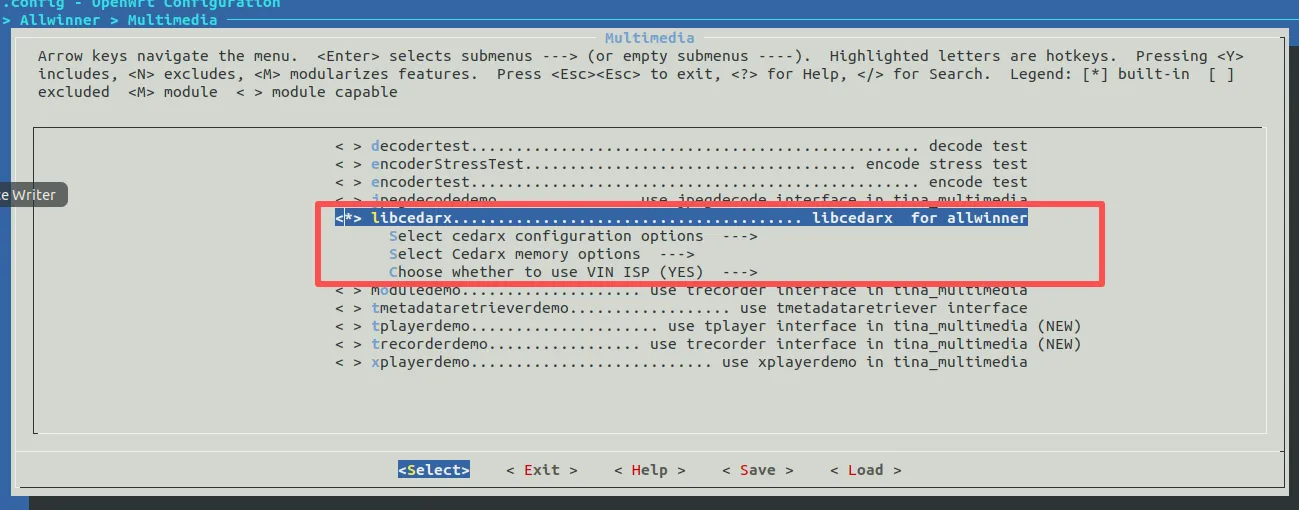
menuconfig 同时打开libcedarx 和 eyesee-mpp-middleware 会编译sdk报错,说是libcedarx和eyesee-mpp-middleware 有冲突,编译的错误如下:
Collected errors:
- check_data_file_clashes: Package libcedarx wants to install file /home/ubuntu/tina-v853-docker/out/v851s/lizard/openwrt/build_dir/target/root-v851s-lizard/etc/cedarc.conf
But that file is already provided by package * eyesee-mpp-middleware - opkg_install_cmd: Cannot install package libcedarx.
- resolve_conffiles: Existing conffile /home/ubuntu/tina-v853-docker/out/v851s/lizard/openwrt/build_dir/target/root-v851s-lizard/etc/udev/udev.conf is different from the conffile in the new package. The new conffile will be placed at /home/ubuntu/tina-v853-docker/out/v851s/lizard/openwrt/build_dir/target/root-v851s-lizard/etc/udev/udev.conf-opkg.
package/Makefile:66: recipe for target 'package/install' failed
make[2]: *** [package/install] Error 255
make[2]: Leaving directory '/home/ubuntu/tina-v853-docker/openwrt/openwrt'
package/Makefile:111: recipe for target '/home/ubuntu/tina-v853-docker/openwrt/openwrt/staging_dir/target/stamp/.package_install' failed
make[1]: *** [/home/ubuntu/tina-v853-docker/openwrt/openwrt/staging_dir/target/stamp/.package_install] Error 2
make[1]: Leaving directory '/home/ubuntu/tina-v853-docker/openwrt/openwrt'
/home/ubuntu/tina-v853-docker/openwrt/openwrt/include/toplevel.mk:236: recipe for target 'world' failed
make: *** [world] Error 2
make: Leaving directory '/home/ubuntu/tina-v853-docker/openwrt/openwrt'
INFO: build_openwrt_rootfs failed
所以我就关闭了eyesee-mpp-middleware。 如menuconfig
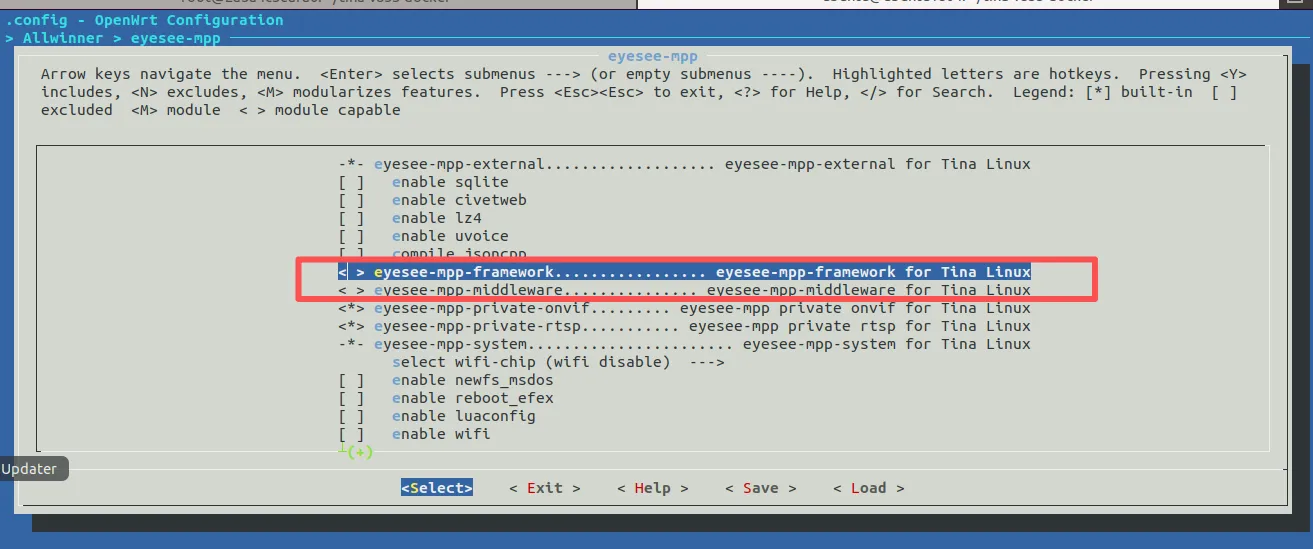
最后就是没有编译错误,同时lib库缺少的都有,在开发板上运行 root@TinaLinux:~# ./tinyvisionIpcV1 640 480 30
报的就是以下错误
root@TinaLinux:~# ./tinyvisionIpcV1 640 480 30
Error relocating ./tinyvisionIpcV1: VencSetParameter: symbol not found
Error relocating ./tinyvisionIpcV1: VencAllocateInputBuf: symbol not found
Error relocating ./tinyvisionIpcV1: VencQueueOutputBuf: symbol not found
Error relocating ./tinyvisionIpcV1: VencStart: symbol not found
Error relocating ./tinyvisionIpcV1: VencDequeueOutputBuf: symbol not found
Error relocating ./tinyvisionIpcV1: VencSetFreq: symbol not found
Error relocating ./tinyvisionIpcV1: VencQueueInputBuf: symbol not found
Error relocating ./tinyvisionIpcV1: VencSetCallbacks: symbol not found
Error relocating ./tinyvisionIpcV1: VencCreate: symbol not found
Error relocating ./tinyvisionIpcV1: VencInit: symbol not found
Error relocating ./tinyvisionIpcV1: VencDestroy: symbol not found
Error relocating ./tinyvisionIpcV1: VencGetParameter: symbol not found
。请问是因为关闭了eyesee-mpp-middleware 的原因导致的吗?
- check_data_file_clashes: Package libcedarx wants to install file /home/ubuntu/tina-v853-docker/out/v851s/lizard/openwrt/build_dir/target/root-v851s-lizard/etc/cedarc.conf
-
@zhangsanxi 大概率是的,VencDequeueOutputBuf是#include "vencoder.h"
#include "EncAdapter.h"里的,对应的libvenc_codec.so等等lib里的函数,没有走mpp-middleware的话,应该是不可以 -
@jaying 是的。我后面打开了mpp,然后重新编译tinyvisionIpcV1,现在是可以编译出来 tinyvisionIpcV1,然后放到开发板上 运行 ./tinyvisionIpcV1 640 480 15 失败了
对应信息如下
root@TinaLinux:~# ./tinyvisionIpcV1 640 480 15
inf: null main:20:start
inf: YuvReader Init:41:start
inf: YuvReader Init:62:open /dev/video0!
inf: YuvReader [ 342.552444] [VIN_ERR]buffer count is invalid, set to 3
Init:117:raw sensor use vin isp
inf: YuvReader Init:150:Camera capture framerate is 20/1
inf: YuvReader Init:181:VIDIOC_S_FMT succeed
inf: YuvReader Init:182:fmt.type = 9
inf: YuvReader Init:183:fmt.fmt.pix_mp.width = 640
inf: YuvReader Init:184:fmt.fmt.pix_mp.height = 480
inf: YuvReader Init:185:fmt.fmt.pix_mp.pixelformat = NV21
inf: YuvReader Init:186:fmt.fmt.pix_mp.field = 1
inf: YuvReader Init:351:stream on succeed
[ISP]video device name is vin_video0
cutils:D/AWIspApi: F:awIspGetIspId, L:48, video0 --> isp0inf: YuvReader Init:360:----ready to get ispExp and ispGain
[ISP]open isp device[0] success!
[ISP_WARN]VIDIOC_VIN_GET_SENSOR_OTP_INFO return error:Invalid argument
[ISP]otp disable[ 342.625690] VE: before freq=300000000
d, msc use 1024
[ISP_WARN]open [ 342.629974] VE: real freq=300000000
/mnt/isp0_1920_1088_20_0_ctx_sav[ 342.637977] VE: before freq=300000000
ed.bin failed, err:No such file [ 342.643692] VE: real freq=300000000
or directory.
[ISP_WARN]cannot find gc2053_mipi_1920_1088_20_0_0 isp config, use gc2053_mipi_1920_1080_20_0_0 -> [gc2053_mipi_default_ini_v853]
[ISP_WARN]cannot find gc2053_mipi_1920_1088_20_0_0 isp config, use gc2053_mipi_1920_1080_20_0_0 -> [gc2053_mipi_default_ini_v853]
[ISP]create isp0 server thread!
inf: YuvReader Init:377:succ
inf: H264Encoder Init:53:start
INFO : cedarc VeInitialize:1185: *** ic_version = 0x1302000023010,
inf: H264Encoder Init:177:****eInputFormat = 1, extend_flag = 0, nOnlineShareBufNum = 0
inf: H264Encoder Init:179:size of sharp param: 126, 240
inf: H264Encoder Init:290:encode_param.encode_format:0iniparser: cannot open /tmp/libcedarc_dynamic_log_level
INFO : cedarc <cdc_log_set_level:43>: Set log level to 5 from /vendor/etc/cedarc.conf
WARNING: cedarc LogVersionInfo:44:Cedar Codec <<<<<<<<<<<<<<<<<<<<<<<<<<<<
tag :
branch: tina-v853-dev
commit: ee230a47e5a2392ec315795121c2d112492fac1c
date : Fri Jul 22 10:37:50 2022 +0800
author: wuguanjian
change-id : I28fe0c31c718f097d61ad6bdbcb4cb5df0bd3575
release_author : lichaopdc
patch :
inf: H264Encoder setEncParam:614:encode_param->rotate = 0, vbv_size = 2097152
inf: H264Encoder Init:308:bEnableGdc = 0, bEnableSharp = 0
inf: H264Encoder Init:349:sps_pps_data.nLength: 42
inf: H264Encoder Init:371:succ
inf: RtspServer Init:20:start
inf: RtspServer Init:46:succ
inf: TinyvisonIpcV1 run:44:loop start
inf: RtspServer run:90:loop start
inf: YuvToH264Encoder run:82:loop start
[ISP_ERR]isp_stat_process_buffer, line: 262,AEWB: stats error, skipping buffer.
inf: YuvToH264Encoder run:90:camera fps 1 h264 0
inf: YuvToH264Encoder run:90:camera fps 0 h264 0
inf: YuvToH264Encoder run:90:camera fps 0 h264 0
inf: YuvToH264Encoder run:90:camera fps 0 h264 0

Copyright © 2024 深圳全志在线有限公司 粤ICP备2021084185号 粤公网安备44030502007680号